
Instagram lets you schedule a carousel post two different ways, and the 'in advance' part works differently depending on which one you use. Inside Instagram's own app, a carousel can hold up to 20 photos or videos, mixed freely, scheduled roughly 75 days ahead. Through any third-party scheduler, including Synapse, a carousel is capped at exactly 10 items, because that number comes from Meta's own Graph API, the mechanism every scheduler uses to publish on your behalf, not from the tool you picked.
Why every scheduler caps a carousel at 10, not 20
Meta's own Content Publishing documentation sets the number directly: a carousel container can reference up to 10 images, videos, or a mix of the two, and the whole container then publishes as a single post (Meta for Developers). That's an API ceiling, not a decision any individual scheduler made, which is why Synapse and every other third-party tool lands on the identical number. The Instagram app itself isn't bound by that same API. It doubled its own in-app carousel limit to 20 photos or videos, mixed freely, back in August 2024 (Social Media Today). Scheduling natively in the app gets you that higher number; routing the post through any Graph-API-based scheduler does not. Meta's docs add two more details worth knowing either way: every slide in a carousel gets cropped to match the first image's framing, and however many items a carousel holds, it only counts as one post against the account's posting rate limit.
Scheduling natively inside the Instagram app
Instagram can schedule a carousel without any third-party tool at all. Open the composer, select multiple photos or videos (up to 20), write the caption, then open Advanced settings and turn on "Schedule this post" to set a date and time roughly 75 days out at most. Account requirements for native scheduling have varied by rollout: check your own Advanced settings menu to confirm whether yours needs a public account or a Business or Creator profile. Either way, native scheduling only reaches the Instagram app itself. There's no equivalent button for also sending that same carousel to the other platforms a cross-posting tool reaches.
Scheduling a carousel in advance through a connected tool
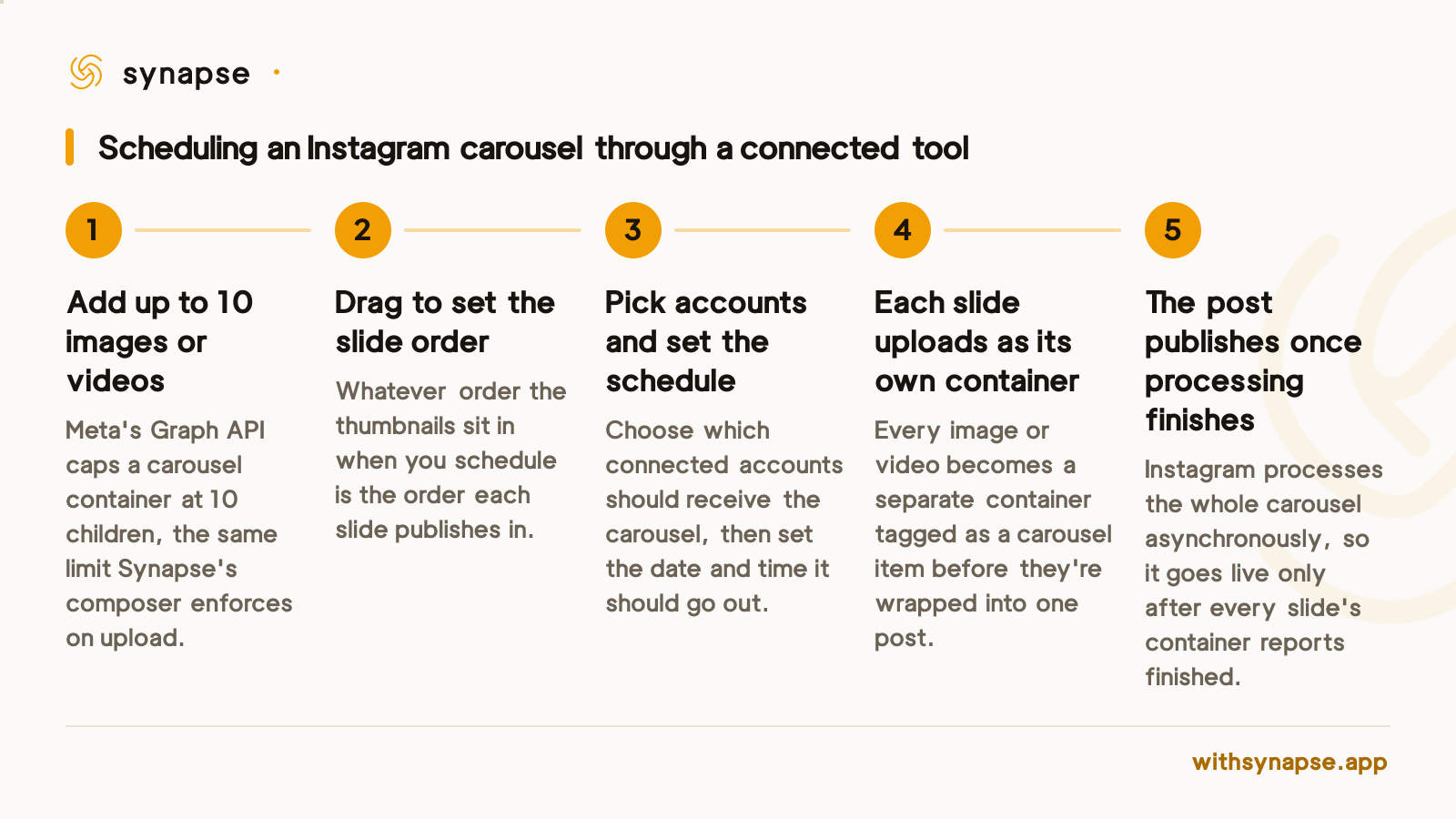
A scheduler reaches Instagram through the same Graph API Meta documents publicly, which is why the workflow is a little more mechanical than one tap in the app. Each image or video in the carousel uploads as its own container first, tagged as a carousel item. Those containers then get wrapped into one parent carousel container, and only the parent gets scheduled and published. Instagram processes that whole bundle asynchronously, so the tool has to poll the container's status until it reports finished before it can confirm the post actually went out: typically seconds for an all-photo carousel, longer for one that includes video.
In Synapse's composer specifically, you build the carousel by dropping in up to 10 images, or one mix of images, then drag any thumbnail to a new position to reorder the slides before you schedule. The order in the picker is the order they publish in. The composer also won't let a video sit in the same carousel as photos; that's not an arbitrary restriction, it mirrors the same all-image-or-all-video boundary the Graph API enforces on carousel children, which is why the app's mixed-media allowance doesn't carry over to any scheduler. For the wider mechanics of connecting an account and managing the queue around it, see how Instagram scheduling works end to end; if the same carousel needs to reach more than one connected Instagram account, connecting additional accounts to a scheduler is the step to do first.
What to do if you need more than 10 images
There's no way to raise the 10-item cap through any scheduler, Synapse included, because the ceiling lives in Meta's API rather than in the tool. The practical workaround is splitting the images into two separate scheduled carousels instead of forcing one oversized post. The cost is the cropping rule from Meta's own docs: Instagram frames every slide in a carousel to match its first image. Plan which image leads each of the two carousels before you upload, not after, since a mismatched first slide reframes everything behind it. Scheduling a video alongside the images in the same post isn't an option either way; see the Reels scheduling workflow if the content you're planning is a single clip rather than a photo set.
Carousel limits at a glance
| Method | Max items per carousel | How far ahead you can schedule |
|---|---|---|
| Instagram's own app | Up to 20 photos or videos, mixed freely | About 75 days ahead, per account |
| A connected scheduler, including Synapse | Up to 10, set by Meta's Graph API | As far ahead as the scheduler's own queue allows |
Frequently asked questions
Why can I add 20 images to an Instagram carousel in the app but only 10 through a scheduler?
Instagram's own app publishes carousels through an internal path that allows up to 20 items. Every third-party scheduler, Synapse included, publishes through Meta's public Graph API instead, and that API's carousel container is hard-capped at 10 children. The 10-item limit comes from Meta, not from any individual tool.
Can a scheduled Instagram carousel mix photos and video in the same post?
Not through a scheduler. Meta's Graph API builds a carousel from a list of child containers and doesn't accept a mix of photo and video containers in one carousel. Synapse's composer enforces the same rule before you ever hit schedule, so a carousel is all-photo or all-video, never both. Instagram's own app allows mixed media in a carousel, but that allowance applies to native posting, not to anything published through the API.
What happens if I try to schedule more than 10 images in one Instagram carousel?
The carousel container won't accept an eleventh item. Synapse's composer keeps only the first 10 files you add to a carousel slot; past that, schedule a second carousel rather than trying to force one oversized post.
Does the order I arrange images in actually become the order they publish in?
Yes. Drag any thumbnail to a new position in Synapse's composer before you schedule, and that's the exact order the carousel publishes in. Nothing reshuffles the slides afterward.
How far in advance can I schedule an Instagram carousel?
Natively inside the Instagram app, roughly 75 days ahead, per Instagram's own scheduling settings. Through a connected scheduler, the limit is whatever that tool's own calendar allows; Synapse doesn't put a cap of its own on how far out you can schedule a post.
Does a scheduled carousel count as more than one post against Instagram's posting limits?
No. Meta's Content Publishing documentation states that a carousel, however many images or videos it contains, counts as a single post against the account's rate limit, the same as a one-image post.