
Instagram limits you to five logged-in accounts per device before it forces a full log-out and log-back-in cycle. A scheduler removes that ceiling by authorizing each Instagram account separately through Meta's own login flow, storing the connection, and letting you post to any combination of them from one composer, without ever opening the Instagram app itself.
Why Instagram's own account limit pushes people to a scheduler
Buffer's own support documentation states the limit plainly: "Instagram allows you to connect up to 5 accounts per device, so you can easily switch between them without logging in and out each time" (Buffer). Under five, that's a minor inconvenience. Past five, an agency running six client brands, or a creator with a personal account plus two niche pages, means logging out of one account to log into another on every device, every single time you want to check messages or publish. A scheduler skips that entirely: each Instagram account gets its own stored connection, so switching between them is a click, not a re-login.
What every Instagram account needs before you connect it
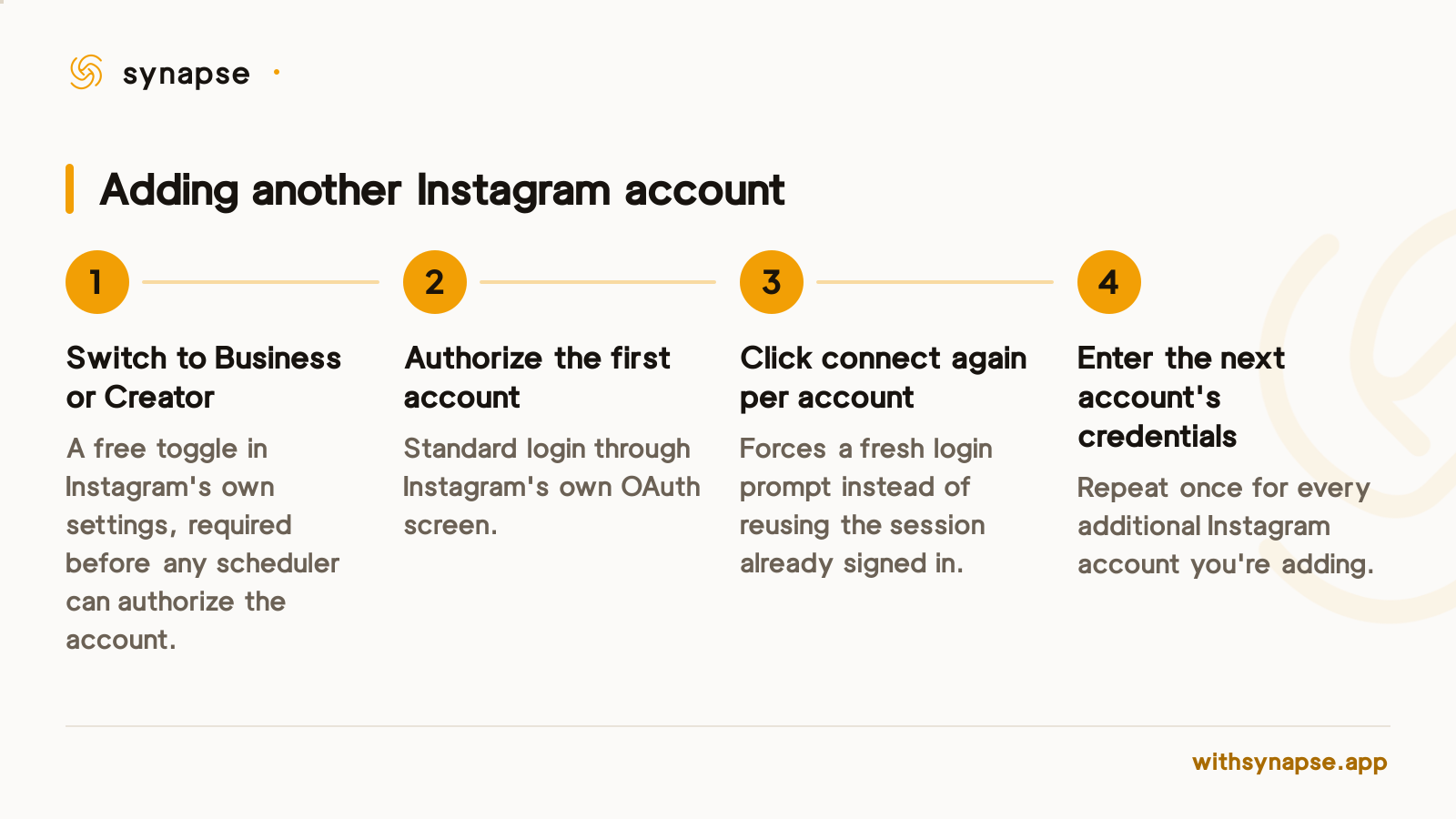
Meta's Instagram Platform API, the mechanism any scheduler uses to post on your behalf, only works with a professional account. Meta's own developer documentation is explicit: "To use the APIs, your app users must have an Instagram professional account. An Instagram professional account can be for a business or creator" (Meta for Developers). A personal Instagram account cannot be connected to any scheduler, full stop, and that's a Meta rule, not a product limitation. The fix is a free toggle: open Instagram's own settings, switch the account to Business or Creator, and it becomes eligible. Do this for every account you plan to connect, not just the first one.
Connecting a second, third, or tenth account
The part that trips people up isn't the first Instagram account, it's the second. Instagram's login defaults to whichever account the browser session already has active, so clicking "Connect Instagram" again in most tools just re-authorizes the same account and looks broken. Synapse forces a fresh login prompt on every connect after the first, so you can type in a different account's credentials instead of landing back on the one you already added. Repeat the cycle per account: switch it to Business or Creator, connect, confirm the login screen is actually asking for credentials rather than reusing the session, and the five-account ceiling stops applying.
Posting to more than one Instagram account without sending the same caption everywhere
Connecting the accounts is half the job. The other half is not making every account read like the same broadcast. Synapse's composer shows each connected account as its own avatar in a picker, tick the ones a post should go to, and override the caption per platform before it sends, so a client's brand account and your own personal account never carry identical text. That matters more on Instagram than most platforms: a caption written for a business audience on one account rarely fits a creator's personal one, even when the underlying photo or Reel is the same file.
If you're scheduling Reels rather than static posts across those accounts, the video file gets locked in before it publishes, so trending audio never gets a chance to touch it. See how to schedule a Reel in advance without losing reach for what that trade-off costs and how to plan around it.
Managing Instagram accounts that belong to different clients
An agency running Instagram for six clients has a different problem than one person with two personal accounts: nobody wants to accidentally publish a client's brand post to the wrong brand's account, or type someone else's Reel caption into the wrong composer window at 4pm. The per-account avatar picker exists for exactly this reason, because it makes the destination visible before you hit publish rather than trusting you remembered which login you're on. That same picker is what makes bulk work manageable too: schedule a week of posts across six client accounts in one sitting instead of logging into each one separately, and see how a scheduler built for agency work handles the team-permission side of that, since an agency account rarely means one person holding every login.
How many Instagram accounts can you actually connect?
Every scheduler counts accounts differently, and the difference changes what running six Instagram accounts actually costs. As of August 2026:
| Tool | Entry price (Aug 2026) | How Instagram accounts are counted |
|---|---|---|
| Synapse | $7/mo (Starter) | 5 accounts on Starter, any platform mix; 15 on Creator ($19/mo) |
| Buffer | $6/channel/mo (Essentials) | Priced per individual account — 6 Instagram accounts runs $36/mo |
| Later | $25/mo | Bundled into an 8-platform "social set" shared across every connected platform, not counted per Instagram account |
Synapse's cap applies to the total account count across all nine platforms, not Instagram specifically, so six Instagram accounts alone would need the $19/mo Creator plan (15-account cap), not the $7/mo Starter tier. Connect past your plan's cap and nothing gets disconnected: the newest accounts beyond the limit are parked, greyed out but not deleted, until you upgrade or free up a slot, so a downgrade never costs you an OAuth grant you'd have to redo from scratch.
Frequently asked questions
Can I connect more than 5 Instagram accounts to a scheduler?
Yes. Instagram's own 5-account limit only applies to logging in and switching accounts inside the Instagram app itself. A scheduler authorizes each account through Meta's Instagram Platform API separately, so the number you can connect is set by the scheduler's own plan limits, not by Instagram.
Does every Instagram account I connect need to be a Business or Creator account?
Yes, with no exception. Meta's Instagram Platform API only grants posting access to professional (Business or Creator) accounts; personal accounts can't be connected to any third-party scheduler. Switching is a free toggle in Instagram's own settings.
Why does connecting a second Instagram account ask me to log in again?
Because Instagram's login defaults to whichever account is already active in your browser session. Without a forced re-authorization step, clicking connect a second time would just re-add the account you already have; the extra login prompt is what lets you enter a different account's credentials.
Can I post the same content to multiple Instagram accounts at once?
Yes. Select every account you want in the composer and it publishes to each independently. You can also override the caption per account first, so a client brand and a personal account don't end up carrying identical text.
What happens if I connect more Instagram accounts than my plan allows?
Nothing gets disconnected. Synapse parks the accounts beyond your plan's cap so they stay connected but can't be published to, until you upgrade or free a slot by disconnecting another account.
Do I need a linked Facebook Page to connect an Instagram account?
Not with Instagram's own login flow. Business or Creator accounts can authorize directly through Instagram, with no linked Facebook Page required. A Page is only needed if you connect Instagram through Facebook Login for Business instead.